How to Connect IP Camera to HCVR and Pentabrids
To Connect an IP Camera:
Please Note: This applies to Tribrid HCVR Units and Pentabrids.
Description
This allows IP Cameras to be connected to HCVR and Pentabrids.
Load More : How to Connect IP Camera to DVR?
Prerequisites
- Computer
- Browser compatible with browser view
- IP camera
- HCVR or Pentabrids
Video Instructions
Step by Step Instructions
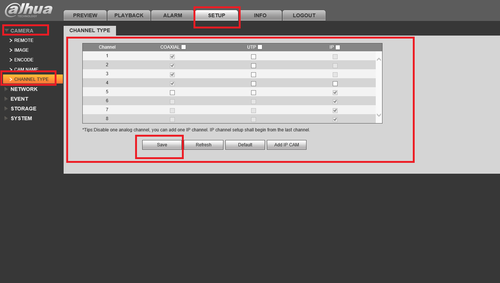
How To Change Channel Type Click on the “Setup Tab” ➞ Camera ➞ Channel Type ➞ Select which Channels are Coaxial, UTP or IP ➞ Click “Save”.
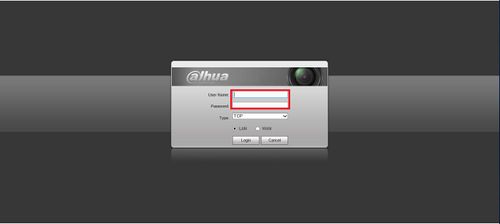
1. Log in to a HCVR:
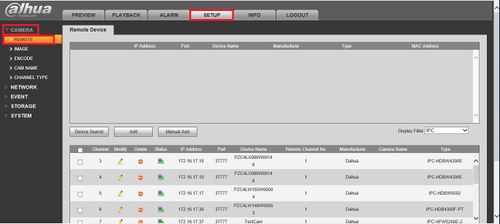
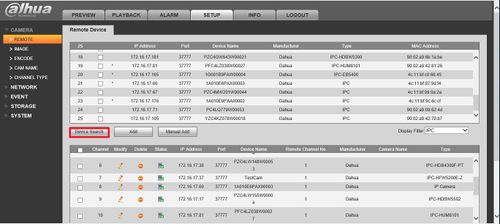
2. Go to setup, click on camera and then remote.
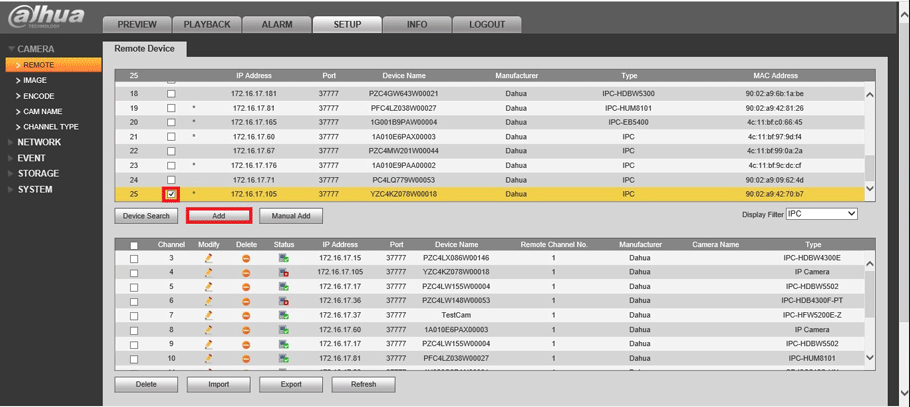
3. Click on device search.
4. Select the IPC that you want and click on add.
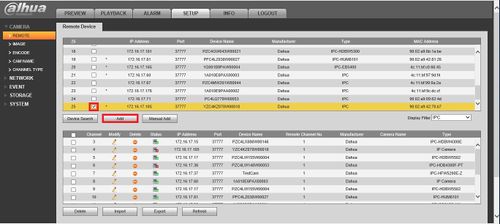
5. Go back to the preview and select the IPC and you may see the IPC that you added.

You May Also Like : How to Connect a WiFi Camera to NVR
problem not solved thanks
I really love you
It was a great sharing
It really worked, I appreciate it!
I really love you
I am having trouble with the installation
hi how can i do
I can’t upload
can you help me please
I sent an e-mail from the communication channel. Can you help?
It really worked, I appreciate it!