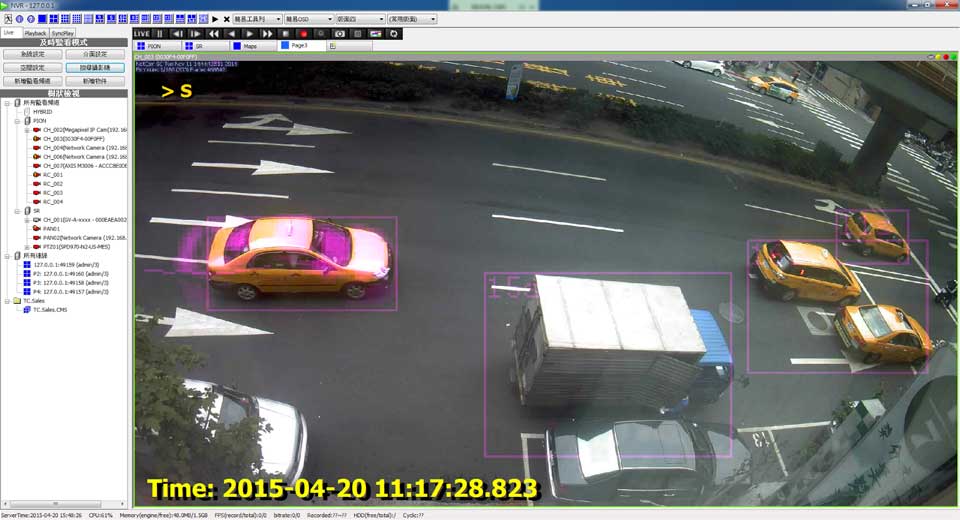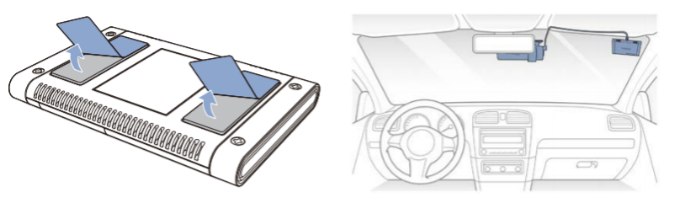
How to Recover Deleted Dashcam Footage, Dashcams enable you to capture the stunning scenic beauty outside and record crucial information like vandalism and accidents. However, what happens when you accidentally delete all that precious dashcam footage? Is it lost forever?

Dashcams enable you to capture the stunning scenic beauty outside and record crucial information like vandalism and accidents. However, what happens when you accidentally delete all that precious dashcam footage? Is it lost forever?
Not quite; Your deleted footage is very much recoverable. This article features five methods to retrieve dashcam footage from Tesla and other cameras. Click here to skip straight to the data recovery tutorial.
Why is My Dashcam Footage Missing?
Due to the continuous recording and saving of dashcam footage on external storage media, it’s quite common to experience file corruption and eventual file disappearance. Here are some potential causes behind your missing dashcam footage:
| Cause | Description |
| 📁 File overwriting | “The downside with dashcam storage devices is that once the storage capacity is full, newly recorded content overwrites and loops over old files. As a result, it’s critical to start your data recovery process as soon as you encounter any deleted files. Note: Some dashcams offer a manual lock feature to prevent overwriting of certain files.” |
| 🦠 File corruption | Dashcam file corruption can arise from power interruptions to your dashcam. Additionally, a faulty SD card and improper ejection are other culprits of file corruption. File system errors with your video data can prevent proper R/O operations – leading to file corruption. |
| 🔧 Physical damage | “If you met with an accident, the impact could have inflicted physical damage on your dashcam. Additionally, sometimes the airbag deployment can dislodge the mounting bracket of your dashcam and damage it. In some cases, extreme temperatures can fry up the dashcam interior and impact the internal memory.” |
| 💻 Software errors | Outdated firmware paves the way for bugs and glitches to corrupt your data. Furthermore, the use of incompatible storage media can trigger incompatibility issues affecting the storage of your dashcam video footage. |
| 🛑 Failed data transfers | Interrupted file transfers can result in potential data loss. Failed data transfers can result in file deletion, because your dashcam OS might automatically delete the partially transferred files. Moreover, bugs or conflicts with your data transfer software could also lead to data loss. |
| 📁 Formatting or accidental deletion | Chances are you accidentally hit the format button on File Explorer while attempting to copy video footage from the storage device. Alternatively, you could have deleted the dashcam footage directly from the vehicle’s dashboard. |
| ⏏️ Disconnection of storage device | Tesla’s dashcam uses a file segmentation technique to record brief one-minute videos, and if the storage device gets disconnected (for instance, from an accident), the succeeding one-minute segments aren’t saved. |
Now that you are aware of the various reasons why dashcam footage goes missing, it’s time to explore the data recovery techniques.
How to Recover Deleted Dashcam Footage
This section features five methods to recover your deleted dashcam footage. Your deleted files are recoverable till they get overwritten. Consequently, time is of the essence.
⏹️ Note: Ensure you stop using the dashcam for recording any footage, to reduce the chances of file overwriting.
Method 1: Check the Storage Device and its Connection
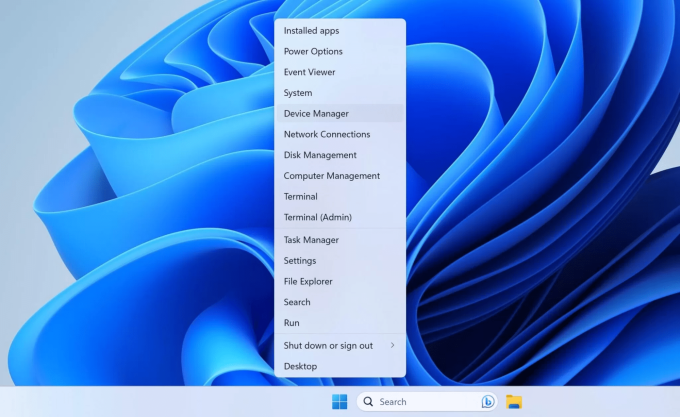
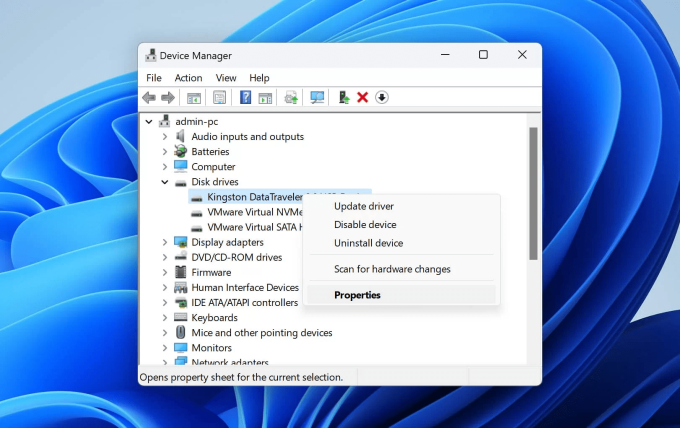
If your PC doesn’t detect the storage device (USB/SD card), troubleshoot by attempting to reconnect. If you still can’t access the storage device, follow these steps:
Method 2: Use Data Recovery Software
Data recovery software can scan and recover deleted data from your USB or SD card. Amongst various data recovery software, our editorial team vouches for Disk Drill.
The tool allows you to recover Tesla dashcam footage efficiently in a few clicks. Moreover, Disk Drill facilitates the data recovery of all major video formats, including MP4, AVI, MKV, etc.
💯 Disk Drill is compatible with all major Windows file systems, like the FAT32, NTFS, exFAT, etc. Furthermore, the tool also supports data recovery from several external storage devices, including USBs and various memory card types, like the microSD, SDXC, SDHC, CF and SD.
Even if File Explorer doesn’t display your storage device, Disk Drill can help restore data. However, the only prerequisite is that Disk Management displays your storage device without the “No Media” label.
❗ Disclaimer: Dashcams save video footage in fragments. As a result, be mindful of the data recovery results as you might find several short video clips. Fortunately, you can test Disk Drill’s free version that offers 500 MB of data recovery.
Here’s how you can use Disk Drill to retrieve deleted dashcam footage:
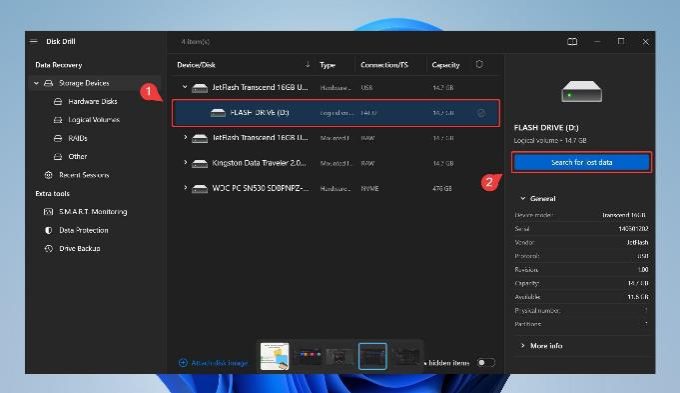
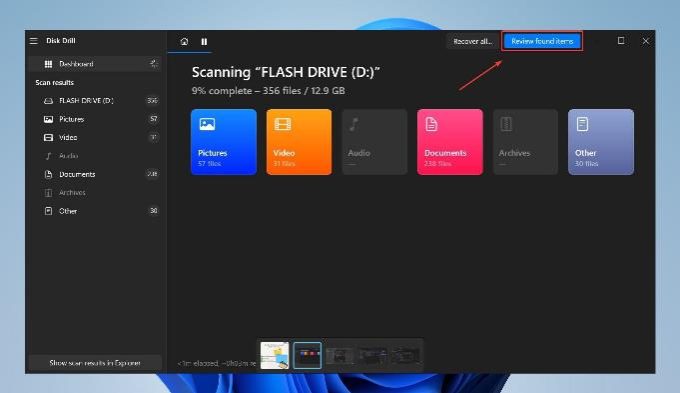
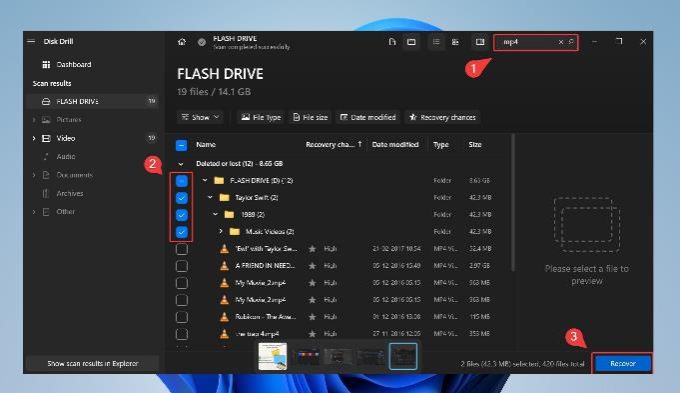
🔍 Use the filter feature to refine the search results. For instance, you can key in mp4 and hit enter to filter the recoverable file list to display only mp4 instances.
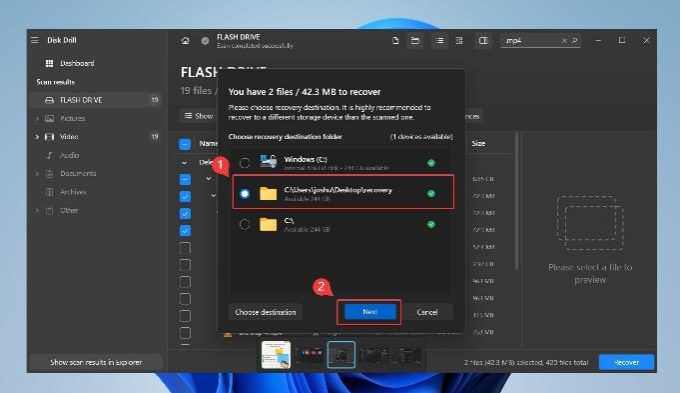
Method 3: Assign a New Drive Letter
If you still struggle to access files on File Explorer, a potential drive conflict might be on the cards. Here’s how you can assign a new drive letter:
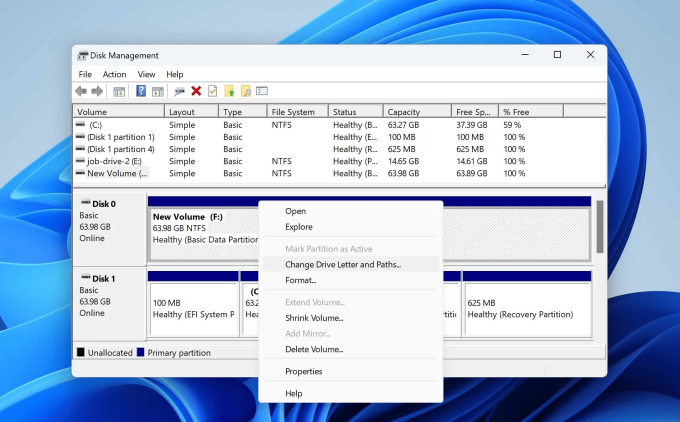
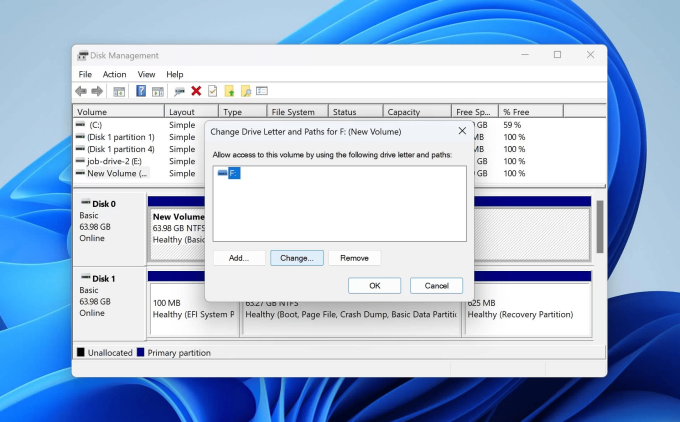
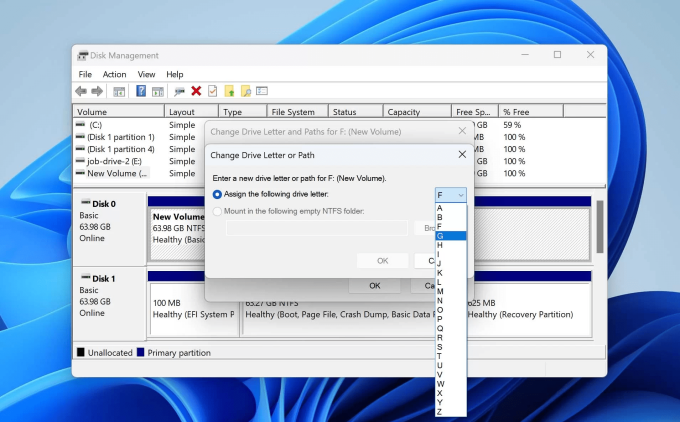
Method 4: Perform the CHKDSK Command
Chkdsk is a Windows utility that can fix minor issues like “SD card is damaged, try formatting it.” Additionally, CHKDSK fixes disk errors and improves file system integrity.
Here’s how you can leverage the CHKDSK functionality:
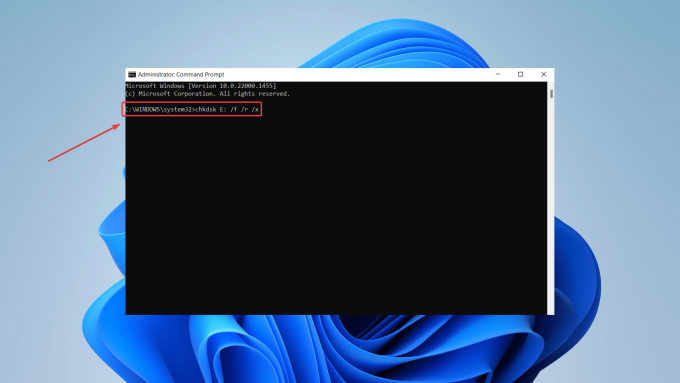
📁 Always perform SD card data recovery before attempting a CHKDSK repair. Implementing CHKDSK fixes can result in lost data.
Method 5: Contact Tesla
If you cannot retrieve lost dashcam footage from any of the above methods, contact Tesla customer support for assistance. Explain your situation and provide relevant details, like the approximate timeframe for which you need the recording.
In some cases, Tesla customer care might remotely access your car’s dashboard to retrieve deleted footage. If the remote session isn’t an option, visit a Tesla service center for in-person troubleshooting.
If you want to use Tesla camera footage as court evidence, request a saved cloud copy of your footage.
Is It Possible to Recover Overwritten Dashcam Footage
Yes, it’s possible to recover overwritten dashcam footage. However, overwritten data essentially means that new video footage replaces the previously saved video footage. In such cases, the probability of recovering overwritten data is very slim. Additionally, dashcams typically use the FAT32 or exFAT file systems for managing data. These file systems don’t offer any built-in mechanisms for data recovery of overwritten data.
Nevertheless, there is a sliver of hope. Fragmentation is another critical aspect to consider. Dashcams often fragment your video footage to optimize storage space. A fragmented video file gets saved across different locations on your storage device. Consequently, overwriting doesn’t necessarily lead to a complete loss of all video information.
🔧 You can attempt to retrieve the overwritten dashcam footage by scanning the storage with data recovery software. Your last resort could be consulting a reputable data recovery center. However, the possibility of successful recovery is relatively low as the retrieved files might be corrupted and, therefore, unusable.
Conclusion
While losing important dashcam footage can be troublesome, it does not have to be permanent. With the right tools and techniques, you can effortlessly recover your deleted dashcam files.
Your first action must be to use data recovery software to recover your dash cam footage. If you can’t access the storage device, try Windows native tricks like CHKDSK, assigning a new drive letter and reinstalling your storage device drivers.
FAQs
How do I view my dashcam footage?
The method of viewing dashcam footage depends upon the type of dashcam you own. Some dashcams feature built-in displays to stream the footage directly. In other cases, you must remove the external storage device from the dashcam and connect it to your PC.
How do I get dashcam footage on my phone?
If your dashcam supports mobile streaming, you can view the dashcam footage on your tablet or smartphone using a reliable dashcam app. Install the app and sync it with your vehicle’s dashcam. You can download and save the videos in the case of having to present mandatory evidence. Garmin VIRB is one popular mobile app to view and save dashcam footage on Android phones.
Do dashcams automatically delete footage?
Most dashcams contain a loop recording feature; It automatically deletes old footage when the SD card gets full to make room for new files. Some dashcams alter video files in short segments before deleting them. They adjust the length of old videos between 1-3 minutes to continue recording the latest files.
Why is my dashcam not recording everything?
Some reasons include incorrect settings, power issues, and overheating. Firmware and upgrade issues can also hinder your dashcam’s ability to record. Faulty hardware is another potential cause of dashcam malfunctioning.
Is it possible to recover recordings from the dashcam’s internal memory?
Yes. However, it depends on factors like your dashcam model and compatibility. Furthermore, other factors include the time since the recording and the physical condition of your dashcam.